 Demo data
Start Here
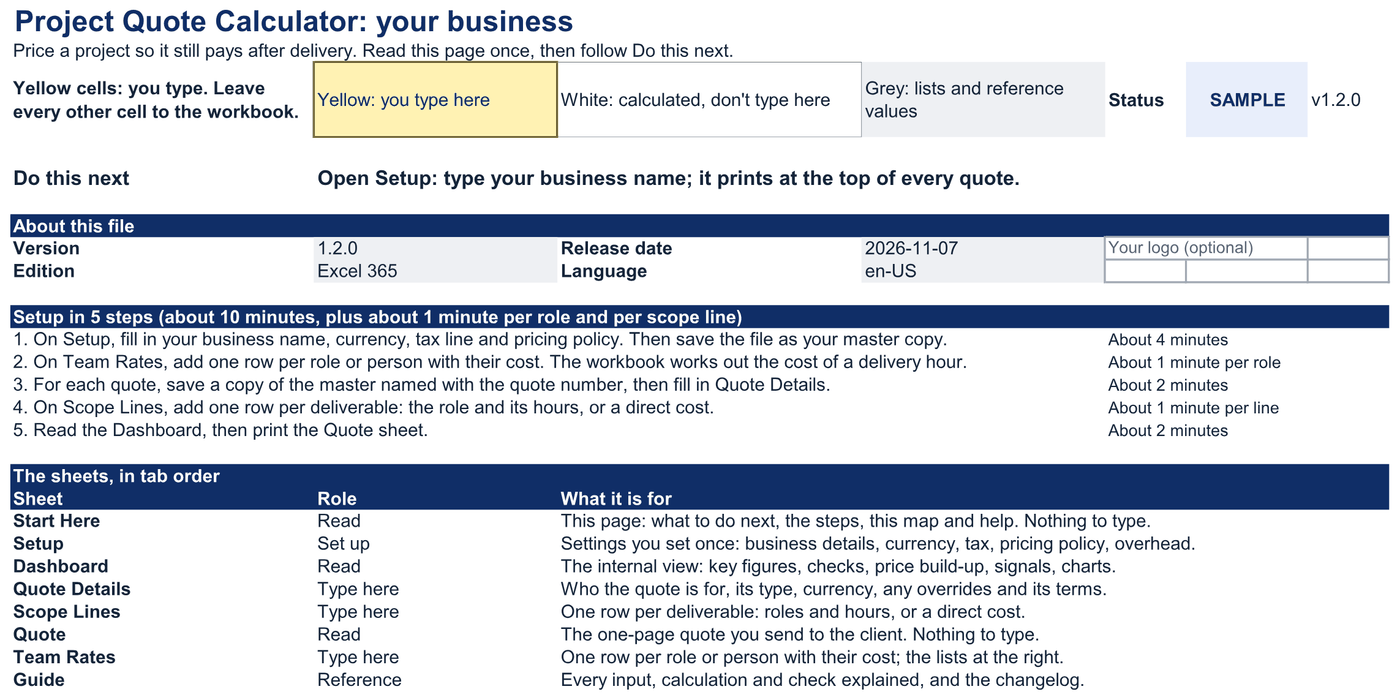
Setup in 5 steps: about 10 minutes, plus about 1 minute per role and per scope line.
Its Do this next line says where to go. The map lists every sheet in tab order, with what it is for.
Project Quote Calculator · Excel 365
For small agencies, studios, consultancies and freelancers who quote projects or retainers from estimated hours.
Loaded rates, margin targets, scope lines and a client-ready quote.
01What it answers
A loaded cost rate for every role, from pay, on-costs, leave and the share of time spent on client work, or from a contractor's hourly or day rate.
The fee at your target margin, rounded the way you choose, with quoted margin and markup side by side and the contribution every discount gives away.
A one-page quote with your logo, scope, totals, terms and a validity date. Internal costs and margins never print.
02Demonstration

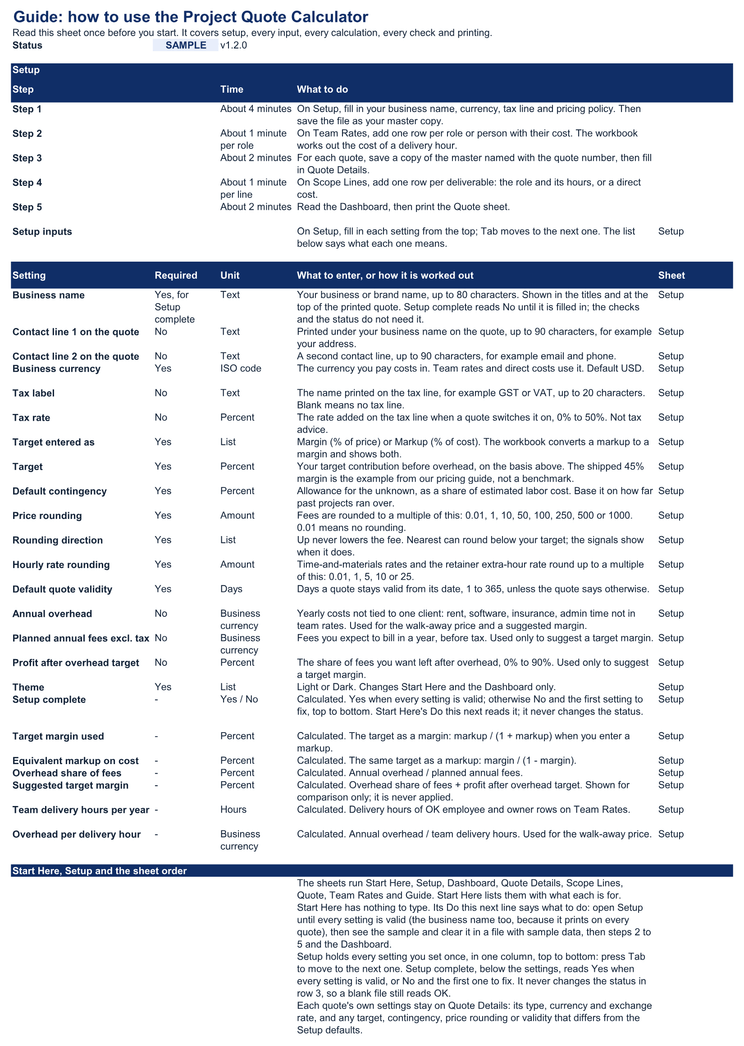
Start Here. What to do next, setup in five steps and a map of the eight sheets. Nothing to type here: your settings are on Setup.
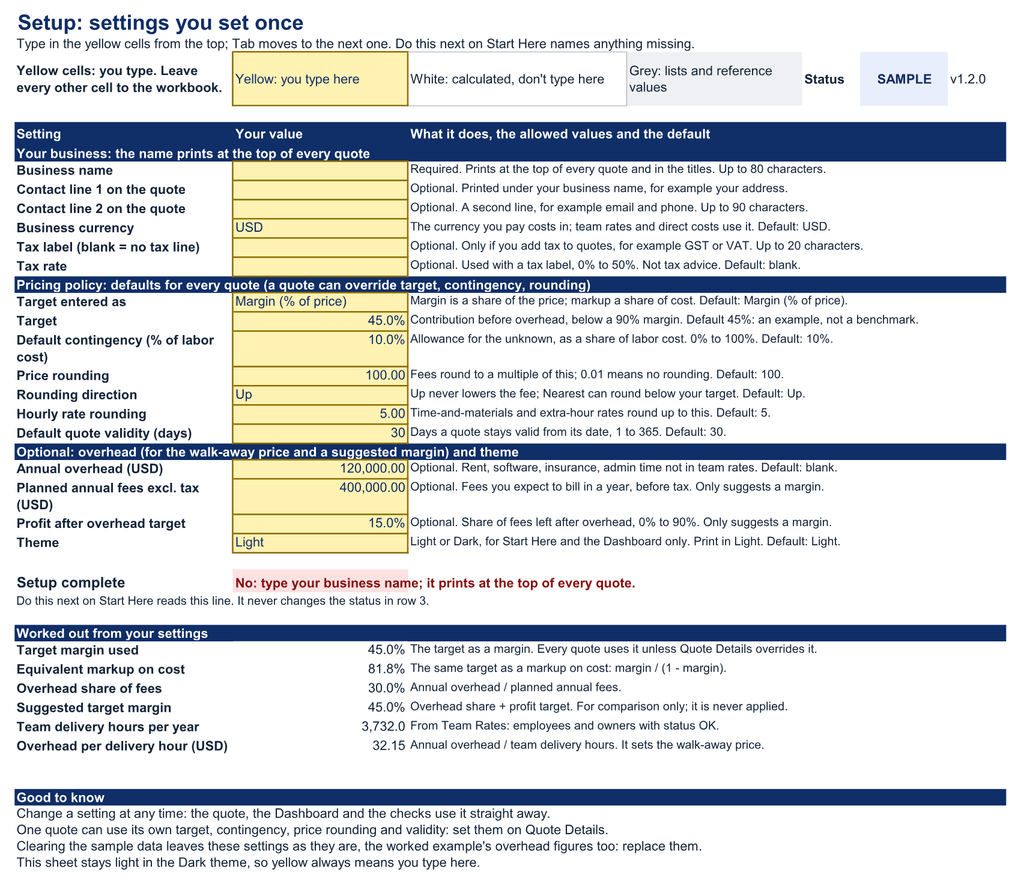
Setup. Your business details, currency, tax line and pricing policy, plus optional overhead. Set them once. It ends with a Setup complete line, which reads No until a business name is typed.
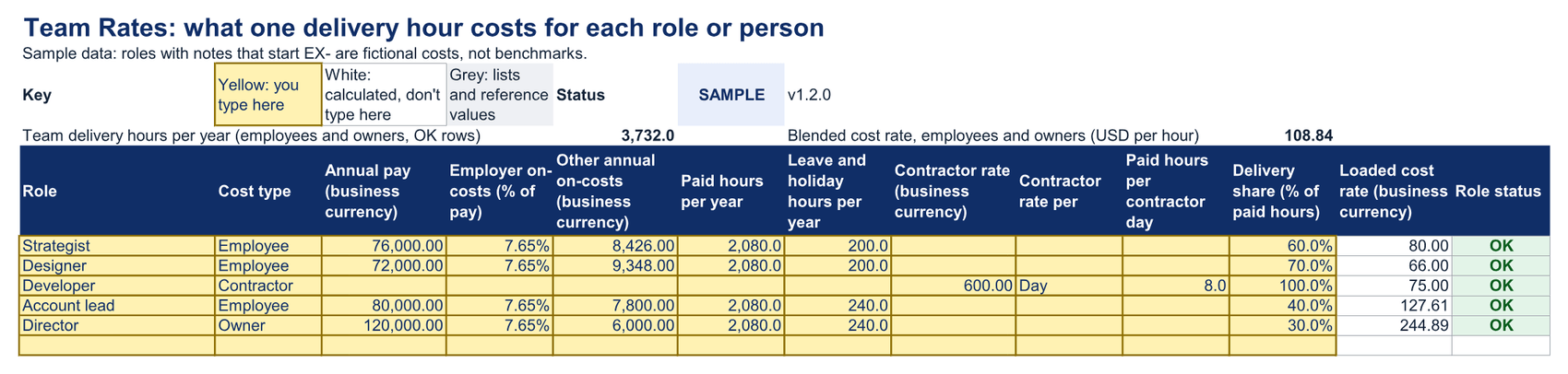
Team rates. One row per role or person. Enter pay, on-costs, leave and delivery share, or a contractor's rate; the workbook works out what one delivery hour costs.
Scope lines. One row per deliverable: up to three roles with their hours, and any direct cost passed through at cost, with a markup, or priced with margin.
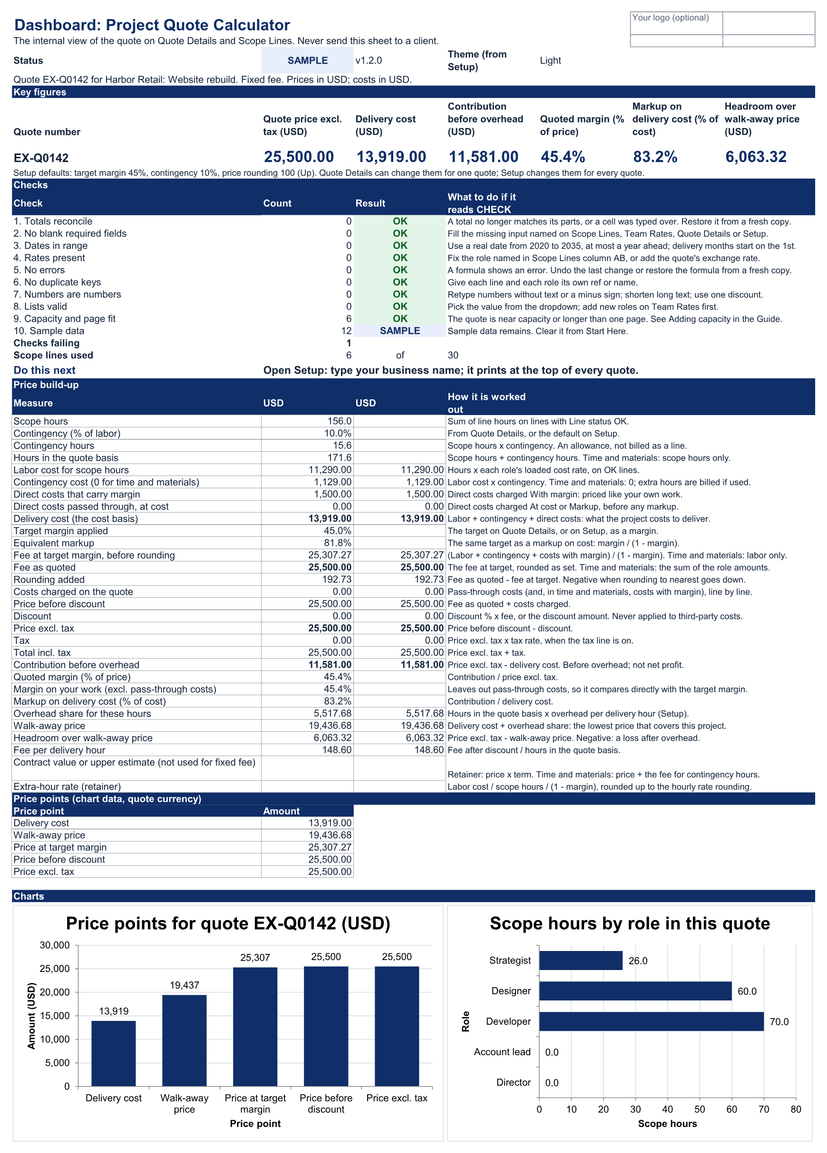
Dashboard. The price built step by step: delivery cost, fee at target, rounding, discount, tax, contribution, quoted margin and markup, and the walk-away price. A line under the key figures shows the Setup defaults they start from. A Do this next line gives one next step for the file as it stands.
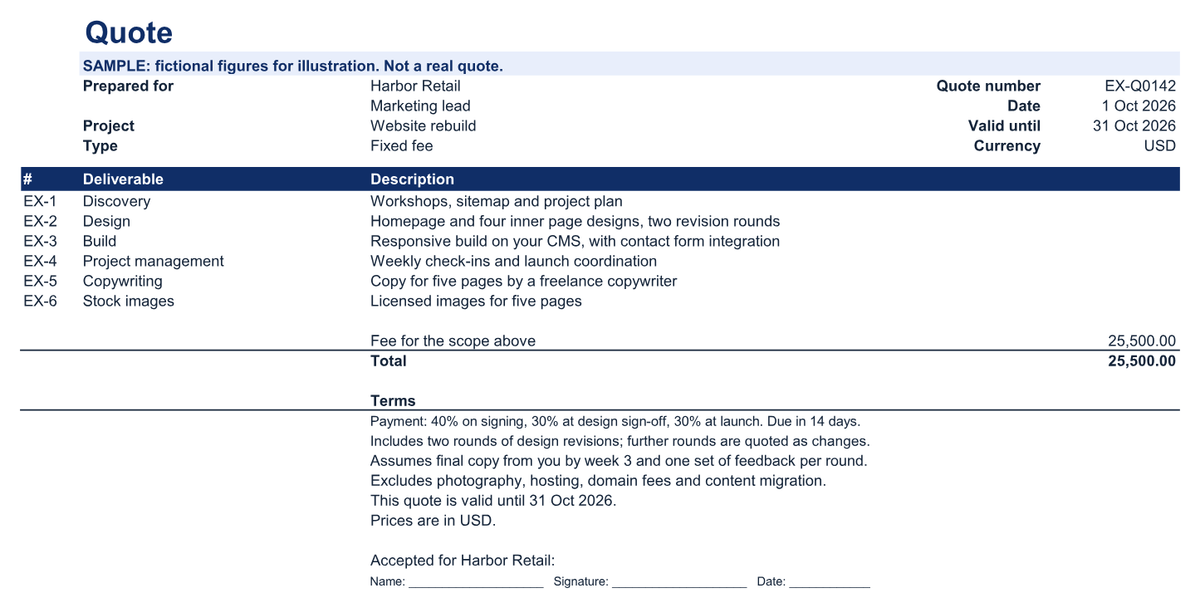
Quote. The page you send: your logo and details, the scope, totals, terms and validity date, on one printed page.
Guide. Every input, calculation and check explained inside the workbook, including how to print in Google Sheets.
03What's inside
Demo dataSetup in 5 steps: about 10 minutes, plus about 1 minute per role and per scope line.
Its Do this next line says where to go. The map lists every sheet in tab order, with what it is for.
Demo dataOne quote can use its own target, contingency, price rounding and validity: set those on Quote Details.
Clearing the sample data leaves these settings as they are, the overhead figures too: replace them with your own.
Demo dataEmployees, owners and contractors (hourly or day rate).
Shows a blended team rate for comparison and flags a role recorded two ways.
Demo dataUp to 30 lines. A line with a missing role or rate is marked Review and the quote shows DRAFT until it is fixed.
Demo dataFixed fee, time and materials, or monthly retainer.
Ten checks, and a line that repeats the Setup defaults, so a print shows what the figures start from.
Ready-made rows to paste into the Client Profitability Tracker.
A Do this next line gives one next step for the quote as it stands.
Demo dataNo cost, margin or internal note ever appears on it.
Demo dataRead it in the workbook or print it.
One ZIP file (about 297 KB), delivered by Payhip straight after payment.
| File | What it is | Size |
|---|---|---|
| xlsxproject- |
The workbook for your own quotes | 149 KB |
| xlsxproject- |
The same workbook with a demo team and quote | 153 KB |
| htmlSTART- |
Open this first: what each file is and where to begin | 10 KB |
| mdquick- |
Setup steps, a first quote, reading the Dashboard and printing the quote | 9 KB |
| mdmetric- |
Every field and calculation defined | 41 KB |
| mdsupport- |
What is tested, what isn't, and how to ask for help | 5 KB |
| mdlicense. |
The license terms | 3 KB |
| mdrelease- |
What is in this version | 14 KB |
| mdmoney- |
The 30-day money-back guarantee | 1 KB |
| txtMANIFEST- |
Checksums to verify your download | 1 KB |
04Setup
Save a master copy and fill in Setup your business details, currency and target margin.
About 4 minutes.Add your team rates one row per role or person; the loaded cost per delivery hour is worked out for you.
About 1 minute per role.Quote the project fill in the quote details and one row per deliverable, check the Dashboard, then print the Quote.
About 1 minute per line.Estimate: a first quote with 3 roles and 6 deliverables takes about 15 minutes, including setup.
05Worked example
Fictional example
Northfield Studio is a fictional design studio quoting a website rebuild. Its strategist costs US$80 a delivery hour, its designer US$66 and its contract developer US$75. The scope comes to 156 hours and US$11,290 of labor, plus 10% contingency and US$1,500 of copywriting and stock images. At a 45% target margin the fee works out at US$25,307, which the studio rounds up to US$25,500: a quoted margin of 45.4%, or an 83.2% markup on cost. A 10% discount would give away US$2,550, 22% of the project's contribution.
| Labor, 156 hours | US$11,290 |
|---|---|
| Contingency, 10% of labor | US$1,129 |
| Direct costs | US$1,500 |
| Delivery cost | US$13,919 |
| Fee at 45% margin | US$25,307 |
|---|---|
| Rounded up to | US$25,500 |
| Contribution before overhead | US$11,581 |
| Quoted margin | 45.4% |
Northfield Studio is not a real business. The figures follow the example in our pricing guide, are illustrative and are not a customer result.
06Fit
07Tested on
Each release is tested against written checks, and the results are listed here and on the compatibility page. "Not yet tested" means exactly that: it may work, but we haven't confirmed it.
Latest test run
| Environment | Status | Checks | Version and build | Last tested | Notes |
|---|---|---|---|---|---|
| Excel 365, Windows desktop | Tested with notes | 38/42 passed, 4 not yet run | Workbook 1.2.0 · Excel 16.0.20527.20150 · Windows Server 2025 Standard 10.0.26100 | Nov 7, 2026 | Automated run on temporary copies: 44 of 46 acceptance cases passed in Excel; the others need Google Sheets or a person at the screen. Not run: 4 checks that need the Excel interface, a system setting or a person. |
| Excel 365, Mac desktop | Not yet tested | — | — | — | Not yet tested. |
| Excel for the web | Not yet tested | — | — | — | Not yet tested. |
| Google Sheets (native edition) | Not yet tested | — | — | — | Not yet tested. The Google Sheets edition is free for every buyer when it ships. |
| Excel mobile (iOS, Android) | Not supported | — | — | — | Viewing only; not tested for data entry. |
| Google Sheets mobile apps | Not supported | — | — | — | Viewing only; not tested for data entry. |
| Google Sheets (importing the .xlsx) | Not supported | — | — | — | Use the native Google Sheets edition. |
| LibreOffice Calc | Not yet tested | — | — | — | — |
| Apple Numbers | Not yet tested | — | — | — | — |
A free update for every buyer, delivered through Payhip. The Dashboard has its own Do this next line. The inputs, names and results are the same.
Inputs affected: No. Nothing you type moved: every setting, name, table and column is where it was.
08What you get
Each purchase includes the files above, updates, email support and a license for your business.
09License
Two licenses. Both let you edit the workbook, keep backups and share the reports it produces. Neither lets you pass the editable file to another business. Tracking your own clients is exactly what Single-business is for. You need Agency/Team only if you keep a working copy for another business's own figures.
included at US$29
For one business or sole trader, and everyone who works in it: staff and contractors.
30-day money-back guarantee. No questions asked.
Store-wide
For an agency and up to 5 client businesses it manages, and everyone who works in the agency. Store-wide: it covers every Metricvalley business template your business owns.
Agency/Team is store-wide: the Client Profitability Tracker's US$99 Agency/Team license, or the Agency Operating Bundle's US$129 Agency/Team tier, covers every Metricvalley business template your business owns, including this calculator, for up to 5 client businesses. This calculator has no Agency/Team price of its own.
The full terms are in the download and shown before checkout. Nothing in them limits rights you have under consumer law. Read the full license terms.
10Guarantee
If the calculator isn't right for your business, email [email protected] within 30 days of purchase with your order number. You'll get a full refund to your original payment method. No questions asked and no forms to fill in; we only ask that you delete your copies. This guarantee is in addition to your rights under the Australian Consumer Law and any other consumer law that applies to you.
11FAQ
It is a free update, delivered through Payhip. The settings moved from Start Here to a new Setup sheet, with the same names; each quote's own settings stay on Quote Details. Formulas, names and results are the same, so your team rates, quote details and scope lines paste straight in. Your 1.0.1 master copy and saved quotes keep working, so you do not have to switch. The setup guide lists where each setting went.
Margin is contribution as a share of the price; markup is the same amount as a share of cost. You enter your target either way, and the Dashboard shows both. A 45% margin is an 81.8% markup.
No. Rates cover pay, on-costs and non-delivery time, as in our guide. Overhead is covered by your margin. If you enter your annual overhead, the workbook suggests a target margin and shows a walk-away price for each quote.
Yes. Choose fixed fee, time and materials (hourly rates and an estimate) or a monthly retainer (monthly fee, included hours and an extra-hour rate).
Only if you ask it to. You can set one tax label and rate and switch the tax line on for a quote. It is not tax advice.
The Dashboard lays the quote out as rows in the tracker's Work Log format. Copy them and paste values into the tracker. The two files are never linked.
Yes, if they all work for the one business that bought it. Agencies that keep working copies for client businesses (up to 5) need Agency/Team, which is store-wide: the Client Profitability Tracker's US$99 Agency/Team license, or the Agency Operating Bundle's US$129 Agency/Team tier, covers every Metricvalley business template you own, including this one. This tool has no Agency/Team price of its own.
Yes. The Google Sheets edition is free for every buyer when it ships, delivered through Payhip. Do not import the .xlsx files into Google Sheets.
Every purchase has a 30-day money-back guarantee. Email support within 30 days with your Payhip order number. You get a full refund to your original payment method.
Checkout is handled by Payhip. You get a download link on the confirmation page and by email: one ZIP file with a blank workbook, a filled-in example workbook and eight short files, including START-HERE.html, the license terms and a checksum manifest.
It hasn't been tested in Excel for Mac yet, so we don't say it works there. The current version is tested in Excel 365 for Windows desktop, and it uses no macros. The compatibility page lists every environment and its status. If you buy it for a Mac and it doesn't work as described, the 30-day money-back guarantee gives you a full refund.
More answers in the setup guide and the help center.