Spreadsheet tools for small agencies
Know what each client leaves after delivery costs.
Log fees, hours and direct costs for each client project, in mixed currencies. One Excel workbook shows what each client contributes before overhead, month by month. One-time purchase, no macros. Metricvalley has no subscription; editing still needs a licensed copy of Excel.
30-day money-back guarantee. No questions asked.
About A$70 at the European Central Bank reference rate on Oct 20, 2026. You pay US$49; your card provider sets the final conversion.
| Client | Net fees | Delivery cost | Contribution before overhead | Contribution margin |
|---|---|---|---|---|
| Aurora Dental | 4,800.00 | 2,390.00 | 2,410.00 | 50.2% |
| Beacon Legal | 3,120.00 | 2,310.00 | 810.00 | 26.0% |
| Copper & Co | 3,025.00 | 1,204.50 | 1,820.50 | 60.2% |
| Driftwood Fitness | 1,950.00 | 2,160.00 | -210.00 | -10.8% |
| Elm Street Hospitality | 2,000.00 | 720.00 | 1,280.00 | 64.0% |
| Fable Studio | 3,500.00 | 3,017.00 | 483.00 | 13.8% |
| Greenfield SaaS | 2,160.00 | 1,740.00 | 420.00 | 19.4% |
| Harbor Retail | 3,500.00 | 2,170.00 | 1,330.00 | 38.0% |
| All clients | 24,055.00 | 15,711.50 | 8,343.50 | 34.7% |
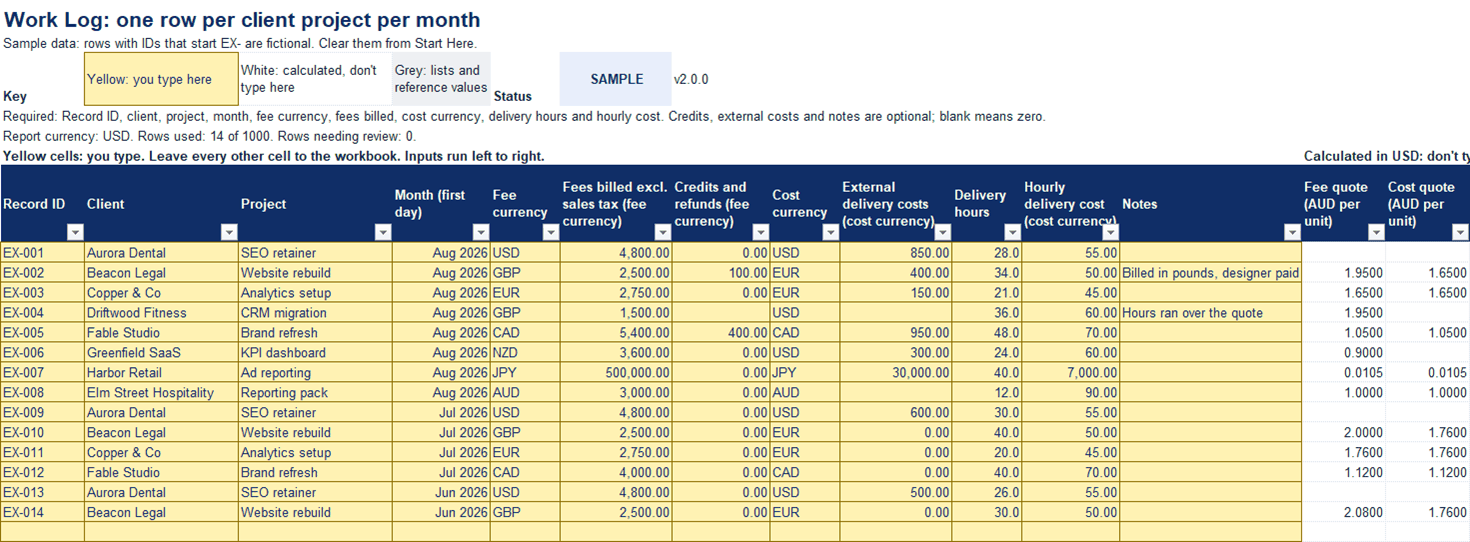
- Yellow cells: you type. Leave every other cell to the workbook.
- Yellow: you type here
- White: calculated, don't type here
- Grey: lists and reference values
Summary sheet from the worked-example file. Previously released as Client Fees & Delivery Tracker. Open full-size image of the Summary sheet

- Tested in Excel 365 for Windows
- No macros
- 10 report currencies
- One-time purchase
- 30-day money-back guarantee
01What it answers
Three questions, answered every month
-
Which clients and projects left the most after delivery costs?
Contribution and margin for every client in the month you pick.
-
Where did the hours outrun the fee?
Contribution per delivery hour shows which work paid for the time, and negative results stay visible instead of being hidden.
-
What does the month look like in one currency?
Bill in pounds, pay freelancers in euros, report in dollars. Every money figure converts to the report currency you choose.
02How it works
Three steps, once a month
-
Log the work.
Add one row per client project for the month: fees billed, credits, direct costs, hours and your internal hourly cost.
-
Add the month's rates.
Enter one rate for each currency you used that month. The report currency is set once, on Start Here.
-
Read the Dashboard.
See net fees, delivery cost, contribution and margin for the month, ten named checks and a chart by client, with problem rows flagged and kept out of the totals.
Yellow cells: you type. Leave every other cell to the workbook.
03Video
See what the templates do
Read what the video shows
- See which clients pay for the work they take. In August, Driftwood Fitness did not. Client Profitability Tracker, Summary sheet, By client, Aug 2026, with eight fictional clients. Driftwood Fitness is outlined: net fees 1,950.00, delivery cost 2,160.00, contribution before overhead -210.00 USD.
- Type one row per client project per month. These clients are fictional. Work Log, row 21: the Aurora Dental row for August is being typed. Cost currency USD, external costs 850.00 and delivery hours 28.0 go in, one cell at a time.
- Complete the row: Aurora Dental's contribution now reads 2,410.00. Summary, By client: before the last cell, Aurora Dental shows 0.00 with one row in review. After the hourly cost is typed, it shows net fees 4,800.00, delivery cost 2,390.00 and contribution 2,410.00, outlined.
- Yellow cells: you type. Leave every other cell to the workbook. Start Here, row 3: the color key. The key sentence and the yellow swatch are outlined; the white and grey swatches sit beside it.
- Ten checks, each with a fix if it reads CHECK. Dashboard Checks block: ten named checks, each with a count, a result (nine read OK; check 10, Sample data, reads SAMPLE) and what to do if it reads CHECK.
- Three more tools are coming: project quotes, retainer capacity and cash runway. Card, "Templates by decision", as it read before the Retainer Burn & Capacity Planner went on sale: Client profitability, Client Profitability Tracker, on sale. Price & quote, Project Quote Calculator, coming. Capacity & utilization, Retainer Burn & Capacity Planner, coming. Cash & runway, Cash & Runway Planner, coming. No release dates yet. On sale now: all four tools.
- Spreadsheet tools for small agencies. Try the live demo at metricvalley.com. End card: Spreadsheet tools for small agencies. Client Profitability Tracker. Excel 365, no macros, one-time purchase. Google Sheets edition included when it ships. metricvalley.com. Note: every sheet shown is the v2.0.0 worked-example file in Excel 365, every client is fictional, and one Work Log row was removed before the video, then typed back in.
04Live demo
Try it before you buy
Change the report currency or a sample exchange rate and watch the totals recalculate. The demo uses three sample records across two months and runs in your browser; nothing you change is sent anywhere.
The browser demo is a small illustration of the workbook's calculations. It is separate from the Excel file.
Previously released as Client Fees & Delivery Tracker. Same product, new name; the files for version 1.x keep the original name.
05Testing Standard
Tested before release, and the results are published
- Every release runs written checks in desktop Excel. Version 2.0.0 passed 41 of 42 in Excel 365 for Windows; none failed, and 1 that needs a person at the screen was not yet run.
- The checks include hard ones on purpose: a deliberate fault for each of the 10 workbook checks, 5,000 rows after adding capacity, and missing and duplicate exchange rates.
- Each environment is marked "tested" or "not yet tested", with the version and date. "Probably works" is never listed as compatible.
Latest test run
- Client Profitability Tracker2.0.0
- Last testedOct 5, 2026
- Excel 365, Mac desktopNot yet tested
- Excel for the webNot yet tested
- Google Sheets (native edition)Not yet tested
Full results for every environment are on the product page.
06Fit
Built for a specific kind of business
A good fit if you:
- Run a small agency, studio or consultancy billing several clients each month
- Deliver work with your own team, freelancers, or both
- Bill or pay in more than one currency
- Review the numbers monthly and want every figure traceable to a cell
- Prefer a file you own to another software subscription
Not the right tool if you need:
- Bookkeeping, invoicing, sales tax or cash-flow reporting. Use your accounting software.
- Net profit after overhead. The workbook stops at contribution before overhead.
- Automatic imports from time-tracking, accounting or bank feeds. Entry is manual.
- Excel for the web, Mac or mobile today. Only Excel 365 on a Windows desktop has been tested so far.
07Templates
08FAQ
Questions before you buy
Is contribution the same as profit?
No. Contribution is net fees minus direct delivery costs (your team's hours at an internal cost rate, plus external costs such as freelancers). It is before overhead like rent, software and admin time, so it is not net profit, and it is not cash flow.
Which version of Excel do I need?
Excel 365 on a Windows desktop computer. That is where the current version is tested. Excel for the web, mobile Excel, Excel for Mac, LibreOffice and Apple Numbers have not been tested yet, so check results carefully if you use them.
Is there a Google Sheets version?
A native Google Sheets edition is in progress, and it is included free for all buyers when it ships. Importing the Excel file into Google Sheets is not supported; use the native edition when it ships.
Can I mix currencies?
Yes. Each row has its own fee currency and cost currency, and the Dashboard and Summary report in one of 10 currencies: USD, EUR, GBP, AUD, CAD, NZD, JPY, SGD, HKD or CHF. You enter the monthly rates yourself; there is no live rate feed.
What happens after I pay?
Checkout is handled by Payhip. You get a download link on the confirmation page and by email: one ZIP file with a blank workbook, a filled-in example workbook and eight short files, including START-HERE.html, the license terms and a checksum manifest.
What if it isn't right for me?
Email us within 30 days and you'll get a full refund to your original payment method. No questions asked, and your rights under consumer law are not affected.