 Demo data
Start Here
Light or Dark theme for Start Here and the Dashboard.
Maker Pricing Calculator · Excel 365
For makers and small-batch studios: candles, soap, jewelry, ceramics, prints, sewn and leather goods, woodwork. On a marketplace, at markets and fairs, on your own website or wholesale to shops.
Cost to make, suggested wholesale and retail prices, and what each place you sell leaves after fees, for up to 100 products.
01What it answers
Materials per batch divided by the items the batch makes, your time at the hourly rate you set, a share of your monthly overheads, and packaging.
A suggested wholesale price at your margin target and a retail price at your multiple, rounded up to the step you choose. Type your own prices to test them.
For every channel: price, shipping charged, fees, postage, what's left after costs, the margin after fees, the lowest price that covers your costs, and the items a month that cover your overheads.
02Demonstration
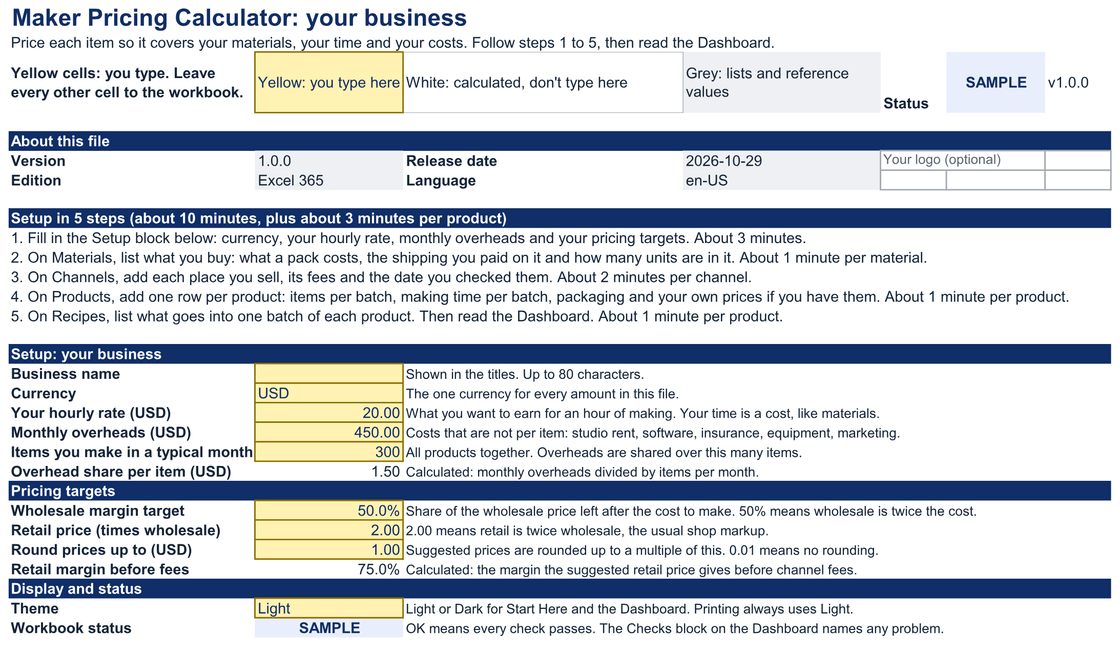
Start Here. Setup in five steps: currency, your hourly rate, monthly overheads, margin target, retail multiple and rounding.
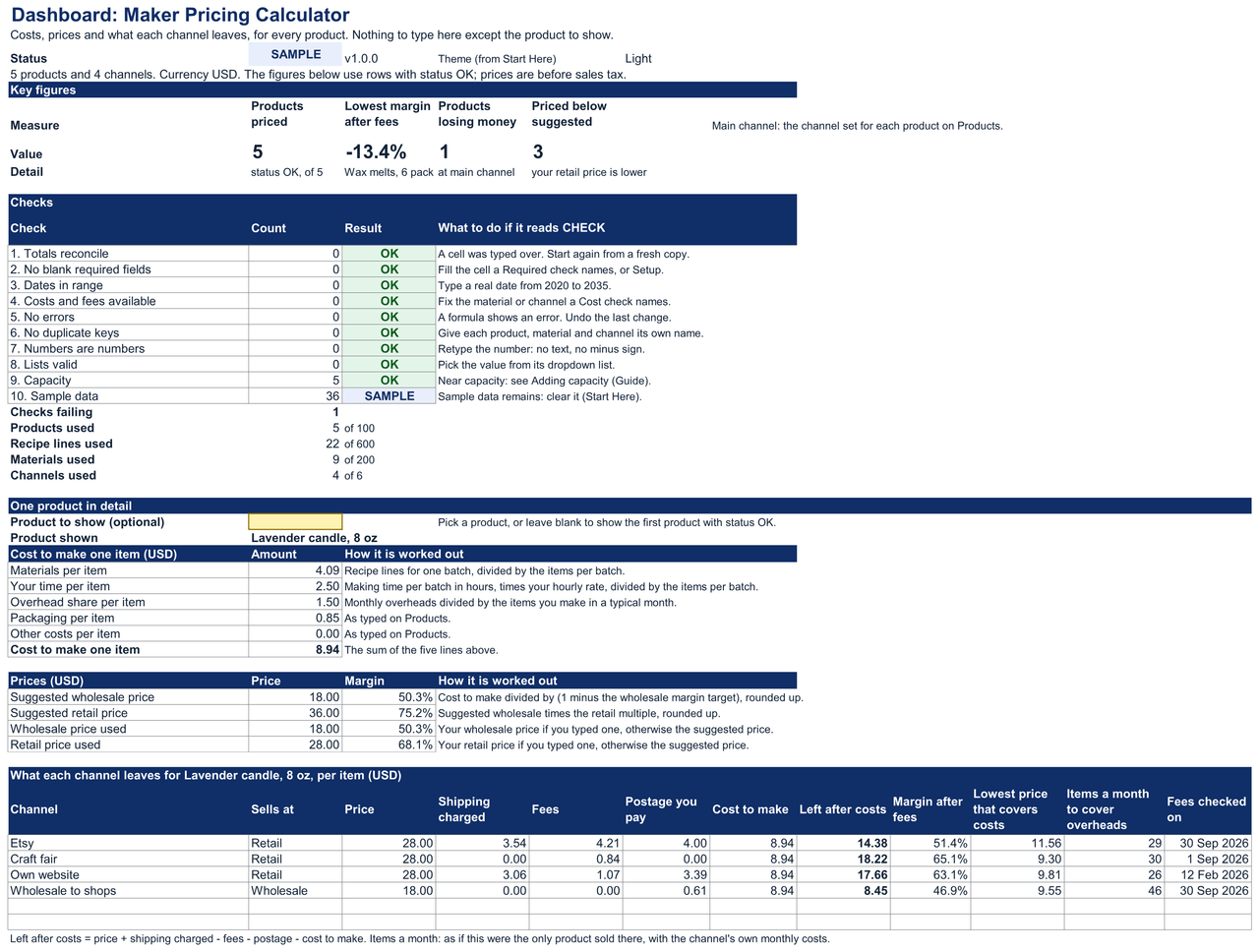
Dashboard. Four key figures, ten checks, one product in detail with a row per channel, six pricing signals and two charts.
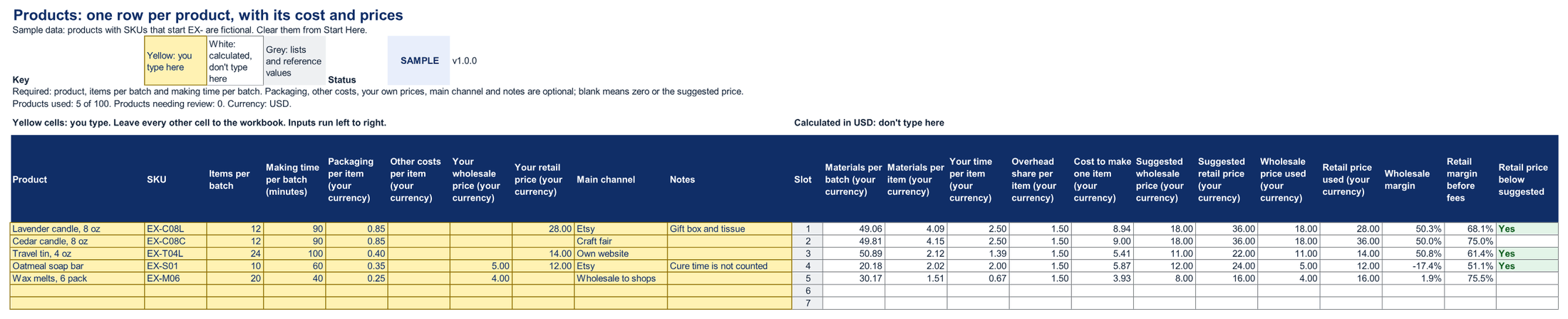
Products. One row per product with its cost to make, suggested and used prices, margins and what it leaves on each channel.
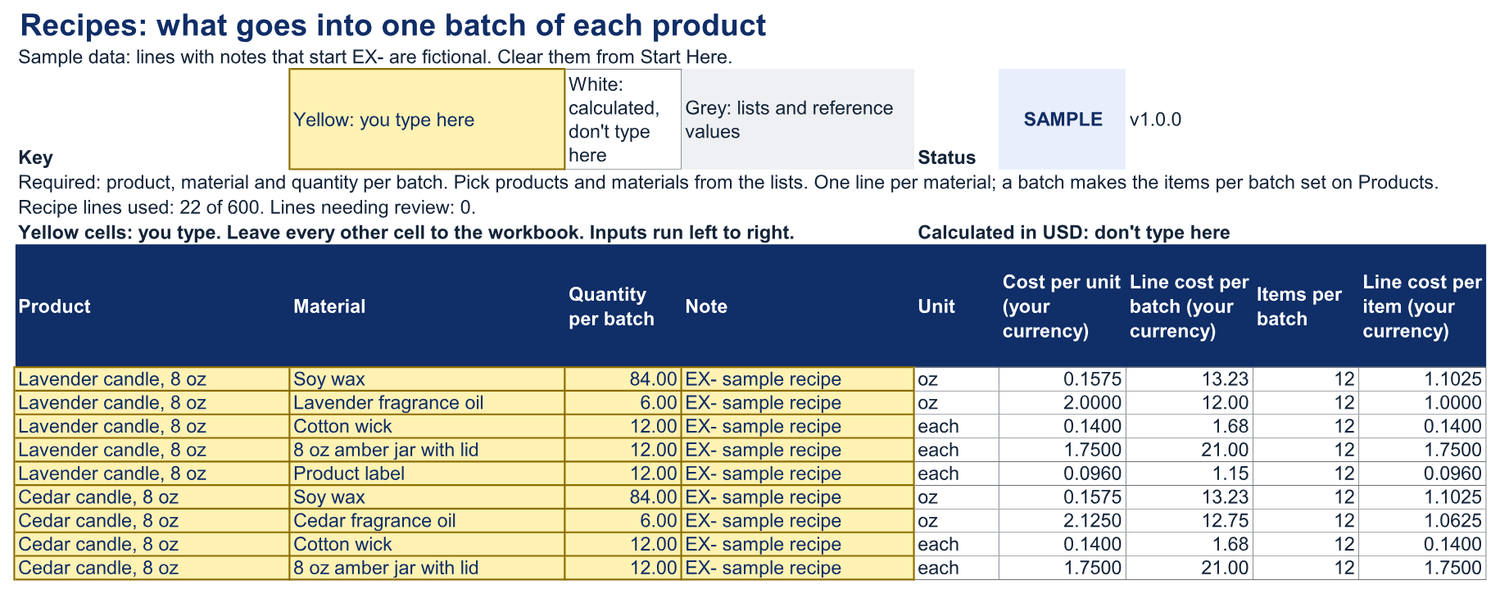
Recipes. What goes into one batch of each product, one line per material.
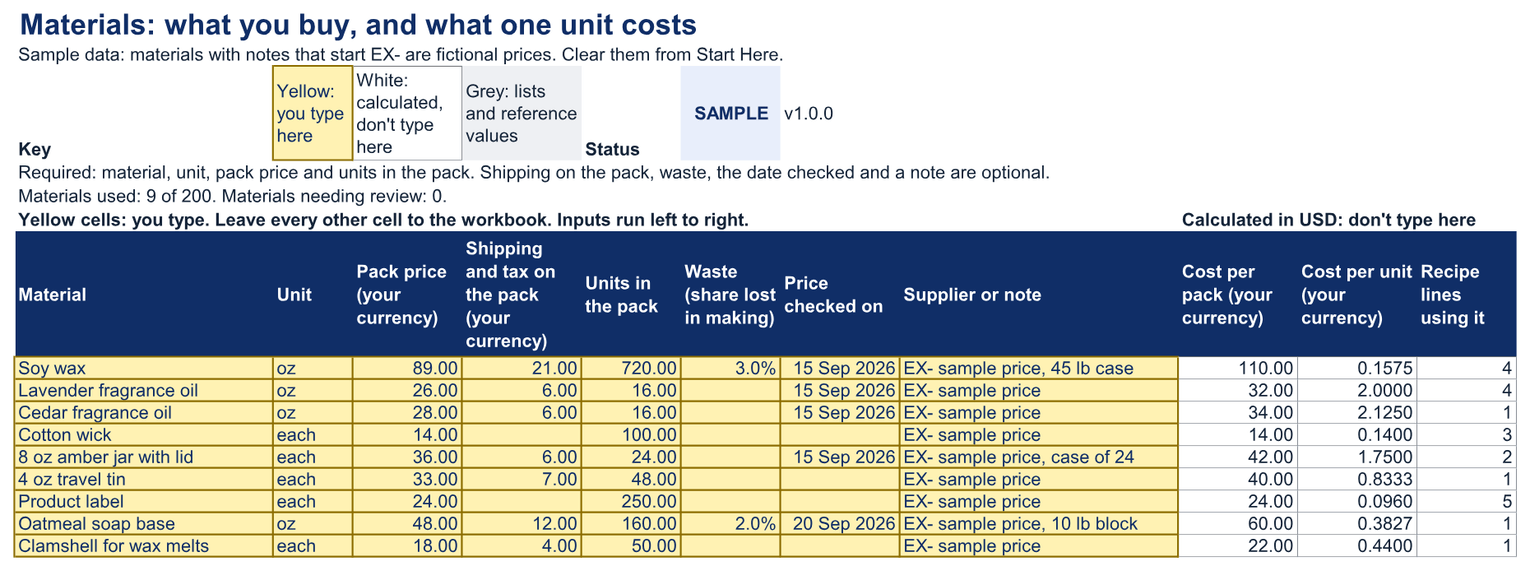
Materials. What you buy, with the pack price, shipping on the pack, units in the pack and waste. The cost per unit is worked out for you.
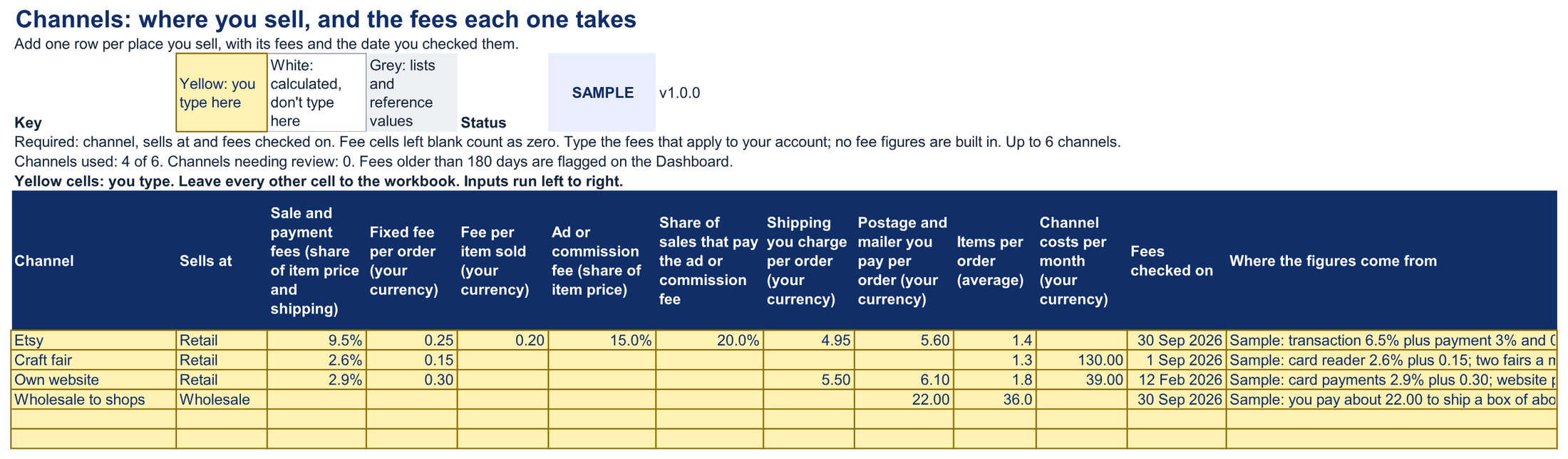
Channels. Each place you sell, with the fees you type and the date you checked them. No fee figures are built in.
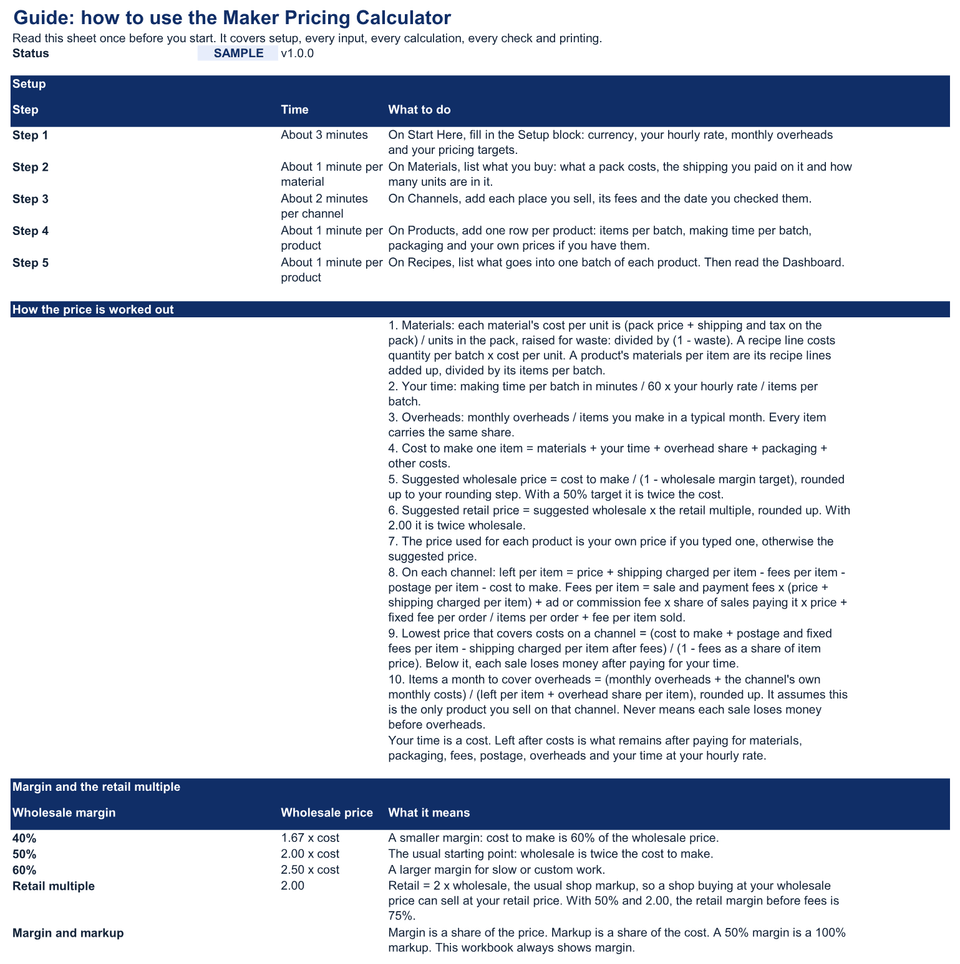
Guide. Every input, calculation and check explained, with what to type for common kinds of channel.
03What's inside
Demo dataLight or Dark theme for Start Here and the Dashboard.
Demo dataPick the product to show in detail at the top of its block.
Demo dataEach size, scent or color is its own row, up to 100 products.
Demo dataUp to 600 recipe lines.
Demo dataUp to 200 materials.
Demo dataUp to 6 channels. Fees older than 180 days are flagged on the Dashboard.
Demo dataThe changelog is its last section.
One ZIP file (about 257 KB), delivered by Payhip straight after payment.
| File | What it is | Size |
|---|---|---|
| xlsxmaker- |
The workbook for your own products | 192 KB |
| xlsxmaker- |
The same workbook with a fictional candle and soap studio's data | 196 KB |
| htmlSTART- |
Open this first: every file and where to begin | 12 KB |
| mdquick- |
Setup steps, a three-record test and how to read the results | 9 KB |
| mdmetric- |
Every field and calculation defined | 19 KB |
| mdsupport- |
Where it's tested, and how to get help | 4 KB |
| mdlicense. |
License terms for both tiers | 3 KB |
| mdrelease- |
What is in this version | 3 KB |
| mdmoney- |
The 30-day money-back guarantee | 1 KB |
| txtMANIFEST- |
Checksums to verify your download | 1 KB |
04Setup
Fill in Setup on Start Here: your currency, hourly rate, monthly overheads and pricing targets.
About 3 minutes.List what you buy on Materials: what a pack costs, the shipping you paid on it and how many units are in it.
About 1 minute per material.Add each place you sell on Channels: its fees and the date you checked them.
About 2 minutes per channel.Add your products on Products: items per batch, making time per batch, packaging and your own prices if you have them.
About 1 minute per product.List each recipe on Recipes: what goes into one batch of each product. Then read the Dashboard.
About 1 minute per product.Estimate: about 10 minutes for setup, plus about 3 minutes per product.
05Worked example
Fictional example
A fictional candle and soap studio pays itself US$20.00 an hour and spreads US$450.00 of monthly overheads over 300 items a month, so every item carries US$1.50. Its 8 oz lavender candle costs US$8.94 to make. The suggested prices are US$18.00 wholesale and US$36.00 retail; at the studio's own retail price of US$28.00, it leaves US$14.38 per candle on Etsy after the sample fees and postage. Its wax melts, sold wholesale at US$4.00, lose US$0.54 a pack, and the Dashboard counts them as the one product losing money.
| Materials (a batch of 12, divided by 12) | US$4.09 |
|---|---|
| Packaging | US$0.85 |
| Your time (90 minutes a batch at US$20.00 an hour) | US$2.50 |
| Share of monthly overheads | US$1.50 |
| Cost to make one | US$8.94 |
The studio, its products and its channel fees are fictional; the fees are sample figures to replace with your own. These are the figures in the worked-example workbook, not a customer result. The workbook counts fee ages from a fixed date, 19 Oct 2026, so the Dashboard flags the same fees whenever you open it.
06Fit
07Tested on
The Testing Standard page explains how releases are tested. "Not yet tested" means exactly that: it may work, but we haven't confirmed it.
Latest test run
| Environment | Status | Checks | Version and build | Last tested | Notes |
|---|---|---|---|---|---|
| Excel 365, Windows desktop | Tested with notes | 37/41 passed, 4 not yet run | Workbook 1.0.0 · Excel 16.0.20527.20112 · Windows Server 2025 Standard 10.0.26100 | Oct 29, 2026 | Automated runs on temporary copies: every calculated value against an independent calculation, checks, validation, protection, clearing, theme, print on Letter and A4, and capacity. Not run: 4 checks that need the Excel interface, a system setting or a person. Not applicable, so not counted: 3.17 (the exchange-rate check; this calculator uses one currency). |
| Excel 365, Mac desktop | Not yet tested | — | — | — | Not yet tested. |
| Excel for the web | Not yet tested | — | — | — | Not yet tested. |
| Google Sheets (native edition) | Not yet tested | — | — | — | Not yet tested. The Google Sheets edition is free for every buyer when it ships. |
| Excel mobile (iOS, Android) | Not supported | — | — | — | Viewing only; not tested for data entry. |
| Google Sheets mobile apps | Not supported | — | — | — | Viewing only; not tested for data entry. |
| Google Sheets (importing the .xlsx) | Not supported | — | — | — | Use the native Google Sheets edition. |
| LibreOffice Calc | Not yet tested | — | — | — | — |
| Apple Numbers | Not yet tested | — | — | — | — |
First release, in Excel 365. The Google Sheets edition is free for every buyer when it ships.
Inputs affected: No. First release.
08What you get
Each purchase includes the files above, updates, email support and a license for your business.
09License
Two licenses. Both let you edit the workbook, keep backups and share the reports it produces. Neither lets you pass the editable file to another business. Tracking your own clients is exactly what Single-business is for. You need Agency/Team only if you keep a working copy for another business's own figures.
included at US$15
For one business or sole trader, and everyone who works in it: staff and contractors.
30-day money-back guarantee. No questions asked.
Store-wide
For an agency and up to 5 client businesses it manages, and everyone who works in the agency. Store-wide: it covers every Metricvalley business template your business owns.
Agency/Team is store-wide: the Client Profitability Tracker's US$99 Agency/Team license, or the Agency Operating Bundle's US$129 Agency/Team tier, covers every Metricvalley business template your business owns, including this calculator, for up to 5 client businesses. This calculator has no Agency/Team price of its own.
The full terms are in the download and shown before checkout. Nothing in them limits rights you have under consumer law. Read the full license terms.
10Guarantee
If the calculator isn't right for your business, email [email protected] within 30 days of purchase with your order number. You'll get a full refund to your original payment method. No questions asked and no forms to fill in; we only ask that you delete your copies. This guarantee is in addition to your rights under the Australian Consumer Law and any other consumer law that applies to you.
11FAQ
No fee figures are built in. You type each channel's fees from your own account, with the date you checked them, and the Dashboard flags fees older than 180 days. The worked example's fees are sample figures to replace with your own.
So every price pays you for the hours you spend making. You choose the hourly rate; a rate of zero is allowed and flagged. What's left after costs is money on top of paying yourself at that rate.
Yes. Set the items per batch to 1, and the materials and making time are counted for that one piece.
Wholesale is your cost to make at the margin you set (50% by default); retail is wholesale times your multiple (2.00 by default). Both are rounded up to the step you choose, and you can type your own prices to see what they leave.
No. It doesn't count stock or work out tax returns. Prices are before sales tax and VAT, and nothing in the calculator is tax, accounting or financial advice.
Only with Agency/Team, which is store-wide: the Client Profitability Tracker's US$99 Agency/Team license, or the Agency Operating Bundle's US$129 Agency/Team tier, covers every Metricvalley business template your business owns, including this one, for up to 5 client businesses. This calculator has no Agency/Team price of its own.
Yes. The Google Sheets edition is free for every buyer when it ships, delivered through your Payhip download link. It is built from the same specification, with the same sheets and checks. Until then, use the Excel file: importing the .xlsx into Google Sheets is not supported.
Checkout is handled by Payhip. You get a download link on the confirmation page and by email: one ZIP file with a blank workbook, a filled-in example workbook and eight short files, including START-HERE.html, the license terms and a checksum manifest.
It hasn't been tested in Excel for Mac yet, so we don't say it works there. The current version is tested in Excel 365 for Windows desktop, and it uses no macros. The compatibility page lists every environment and its status. If you buy it for a Mac and it doesn't work as described, the 30-day money-back guarantee gives you a full refund.
More answers in the setup guide and the help center.