 Demo data
Start Here
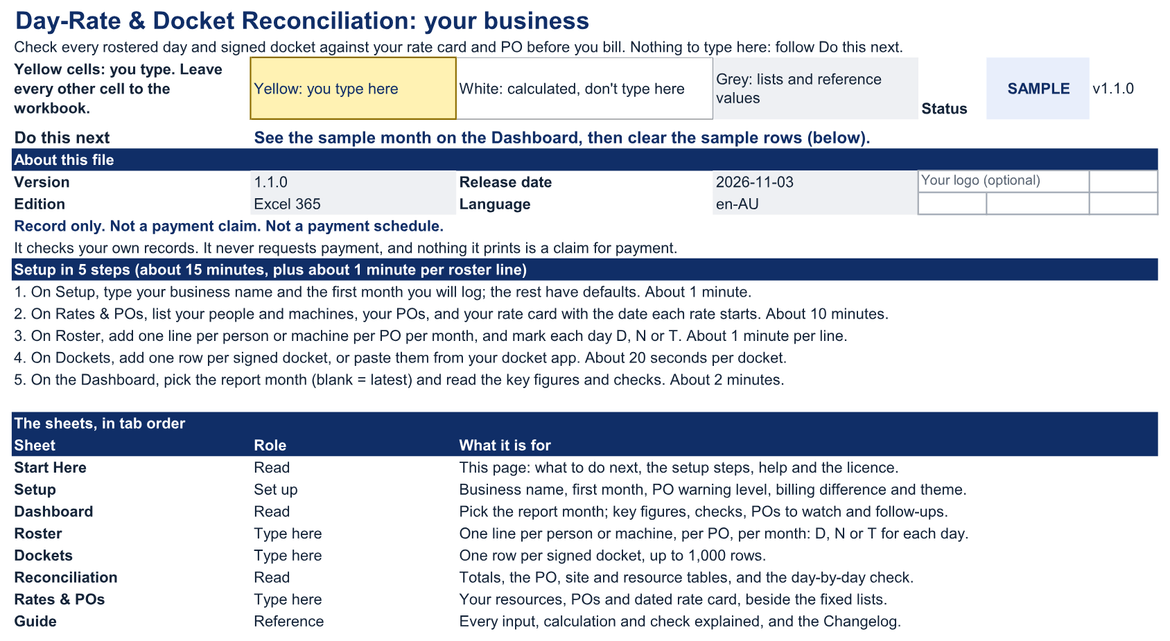
Its Do this next line says where to go: Setup until every setting is valid, then the steps that are left.
Version, status, licence and support details on one printable page.
Day-Rate & Docket Reconciliation · Excel 365 · Australian edition
For mining-services, plant hire, labour hire and civil contractors in Australia who bill a principal by the day or the hour against a purchase order.
A monthly reconciliation workbook for contractors who bill a principal by the day or the hour: roster, signed dockets, rate card and POs in one file. Record only. Not a payment claim.
01What it answers
The day check shows each roster line's days for the month: D, N or T where a docket matches, Gap where a rostered day has no docket, and Extra where a docket falls on a day nobody was rostered.
Every docket is priced from a dated rate line: day or hourly basis, shift hours, extra hours, half days, standby, travel days, and mob and demob. Signed dockets are ready to bill; unsigned and disputed ones are priced but kept apart.
Billed minus signed for every roster line, so a missed rate change or extra hours shows up before the principal finds it.
Used to date against each PO's value, with a warning level you set (90% unless you change it). A PO over its value reads Over PO.
02Demonstration


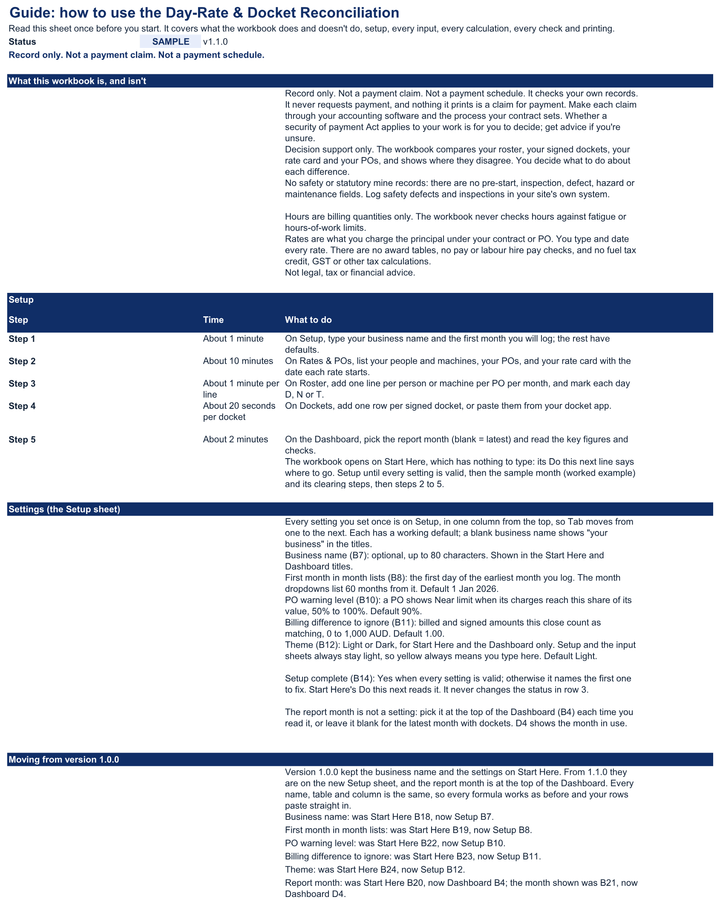
Start Here. What to do next, five setup steps with their times and a map of the eight sheets. Nothing to type here: your settings are on Setup.
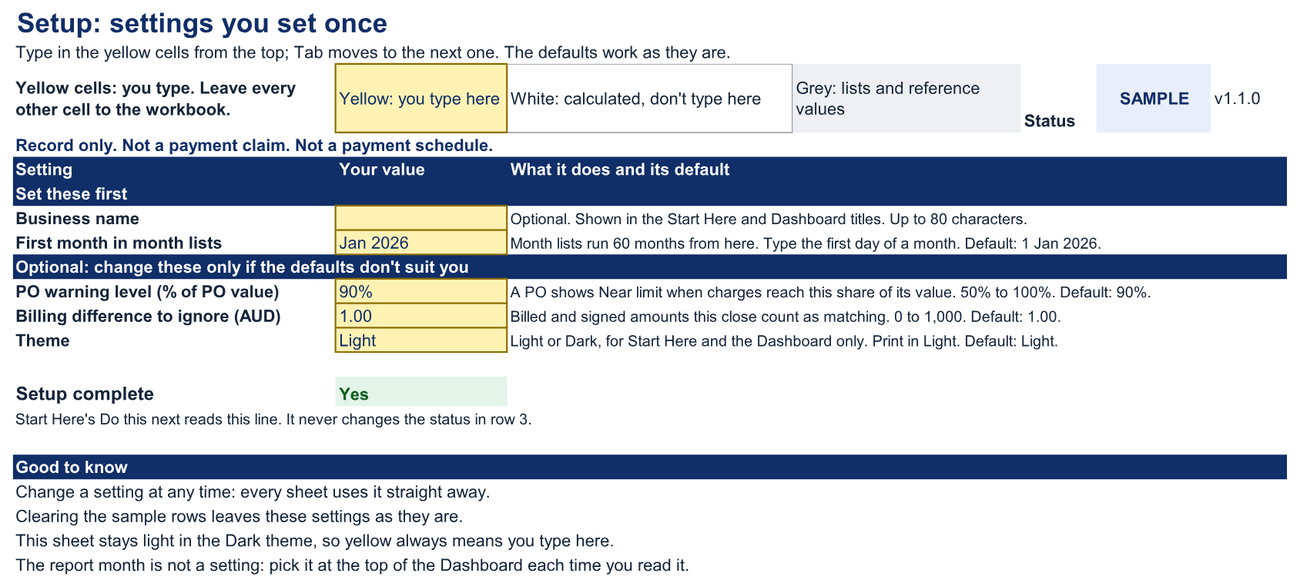
Setup. Your business name, the first month you log, the PO warning level, the billing difference to ignore and the theme, each with a working default. It ends with a Setup complete line.
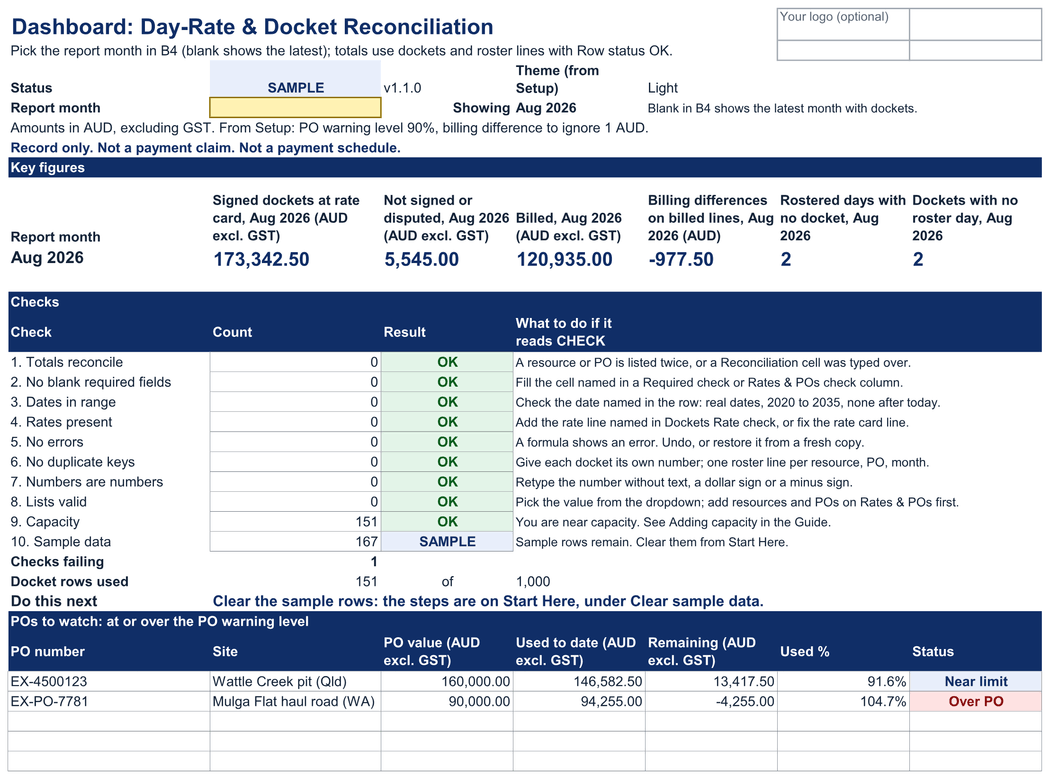
Dashboard. Pick the report month at the top, then six key figures for that month, ten named checks, a line that says what to do next, the POs at or over your warning level, and the resources to follow up. Two charts follow on the second printed page.
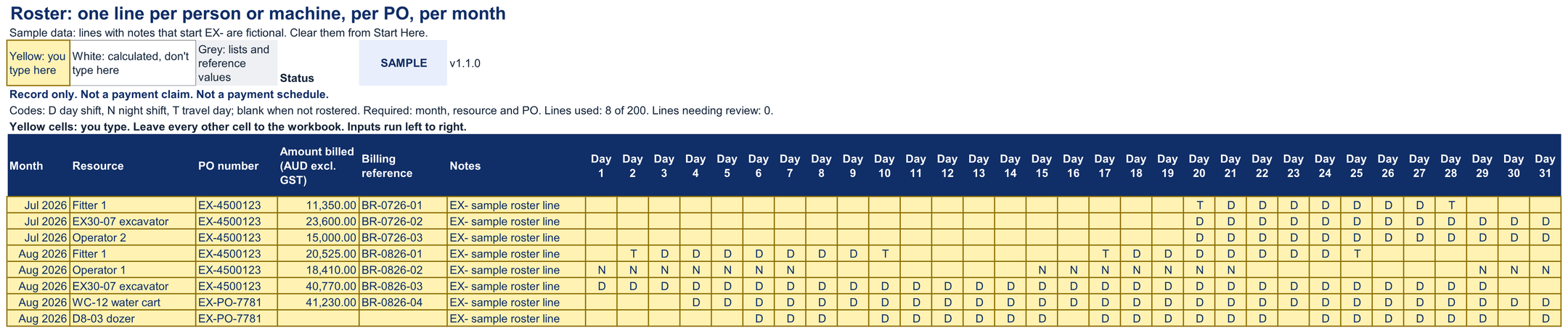
Roster. One line per person or machine, per PO, per month: D (day shift), N (night shift) or T (travel day) on each rostered date, and the amount you billed for the line.
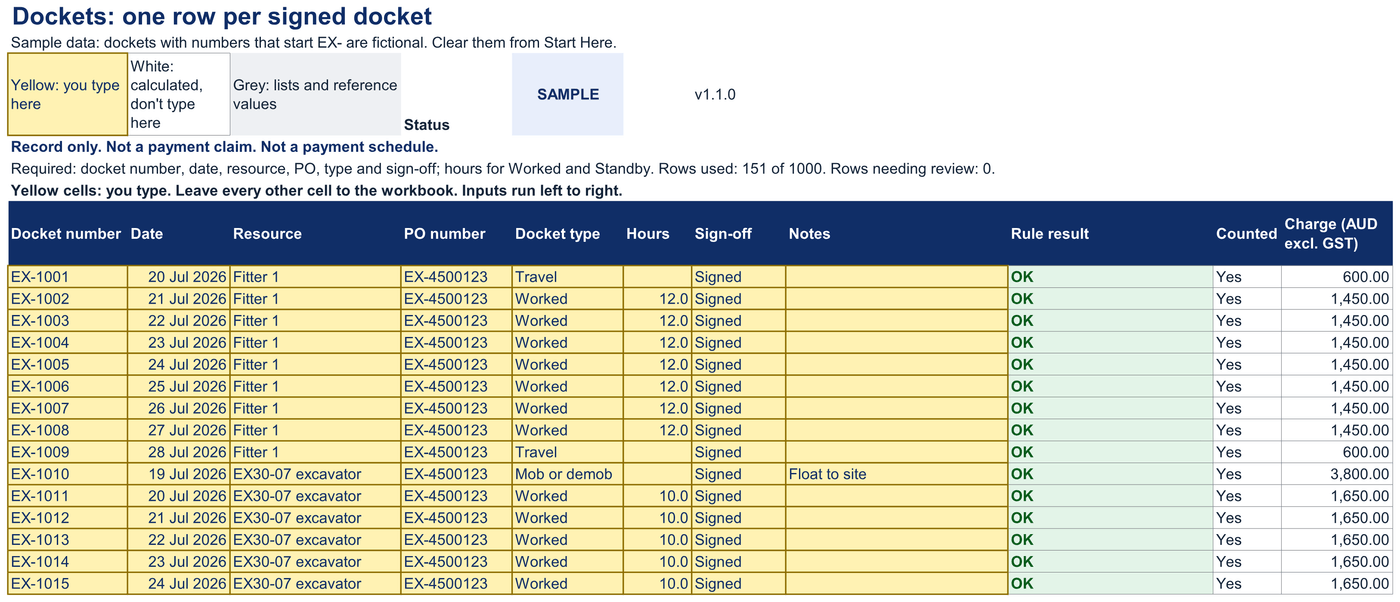
Dockets. One row per docket. You type the number, date, resource, PO, type, hours and sign-off; the rest of the row finds the roster day and the rate line, and prices it.
Reconciliation. Totals for the month and the file, every PO, every site and every resource, and the day check: Gap where a rostered day has no docket, Extra where a docket falls on a day nobody was rostered.
Rates & POs. Your people and machines, your POs, and your rate card with the date each rate starts: day or hourly basis, shift hours, extra hours, half days, standby, travel and mob or demob.
Guide. Every input, calculation, rule and check explained, with printing, adding capacity, clearing the sample data and the changelog.
03What's inside
Demo dataIts Do this next line says where to go: Setup until every setting is valid, then the steps that are left.
Version, status, licence and support details on one printable page.
Demo dataThe report month is not a setting. You pick it at the top of the Dashboard each time you read it.
Clearing the sample rows leaves these settings as they are.
Demo dataReport month at the top: pick a month, or leave it blank for the latest month with dockets.
Status in row 3 of every sheet: OK, CHECK (n) or SAMPLE.
Charts: PO value against used to date, and signed dockets against billed by resource.
Demo data200 roster lines; the Guide shows how to add more.
Demo data1,000 docket rows; tested at 4,000 after following the Guide's steps.
Rows with a missing detail, an unknown resource or PO, a missing rate line or a duplicate read Review and are left out of the totals.
Demo dataNothing to type here. Totals use rows with Row status OK.
Demo dataWhen a rate changes, add a line with the new date: each docket uses the latest line on or before its date.
Demo dataRead it in the workbook or print it.
One ZIP file (about 651 KB), delivered by Payhip straight after payment.
| File | What it is | Size |
|---|---|---|
| xlsxday- |
The workbook for your own roster, dockets, rate card and POs | 656 KB |
| xlsxday- |
The same workbook with a fictional month | 679 KB |
| htmlSTART- |
Open this first: every file and where to begin | 10 KB |
| mdquick- |
Setup steps and how to read the results | 9 KB |
| mdmetric- |
Every field and calculation defined | 19 KB |
| mdsupport- |
Where it's tested, and how to get help | 8 KB |
| mdlicense. |
Licence terms for both tiers | 4 KB |
| mdrelease- |
What is in this version | 7 KB |
| mdmoney- |
The 30-day money-back guarantee | 1 KB |
| txtMANIFEST- |
Checksums to verify your download | 1 KB |
04Setup
Fill in Setup type your business name and the first month you will log; the rest have working defaults.
About 1 minute.List your people, machines, POs and rate card on Rates & POs with the date each rate starts.
About 10 minutes.Add your roster on Roster one line per person or machine, per PO, per month, with D, N or T on each rostered day.
About 1 minute per line.Add your dockets on Dockets one row per docket, typed or pasted from your docket app.
About 20 seconds per docket.Pick the report month and read the Dashboard the month is at the top (blank = latest). OK means the checks pass, and the key figures show what to chase.
About 2 minutes.Estimate: a first month with 8 roster lines and 120 dockets takes about an hour, most of it typing dockets. Pasting them from a docket app's export is quicker.
05Worked example
Fictional example
A fictional contractor bills two POs with three people and three machines: one PO at a Queensland pit, one on a Western Australian haul road. In August 2026 its signed dockets come to A$173,342.50 at the rate card, excluding GST. Two rostered days have no docket, and two dockets fall on days nobody was rostered. The excavator's rate went up on 16 August, but it was billed at the old rate, so its billing is A$790.00 below its signed dockets. One PO is at 91.6% of its value, and the other is over it.
| Signed dockets on billed lines | 121,912.50 |
|---|---|
| Billed | 120,935.00 |
| Billing differences | −977.50 |
| PO value | 90,000.00 |
|---|---|
| Used to date | 94,255.00 |
| Remaining | −4,255.00 |
The contractor, its principals, sites and people are fictional. These are the figures in the worked-example workbook, not a customer result.
06Fit
07Tested on
Each release is tested against written checks, and the results are listed here and on the compatibility page. "Not yet tested" means exactly that: it may work, but we haven't confirmed it.
Latest test run
| Environment | Status | Checks | Version and build | Last tested | Notes |
|---|---|---|---|---|---|
| Excel 365, Windows desktop | Tested with notes | 41/42 passed, 1 not yet run | Workbook 1.1.0 · Excel 16.0.20527.20112 · Windows Server 2025 Standard 10.0.26100 | Nov 3, 2026 | Automated runs on temporary copies: every calculated value against an independent calculation, the checks, validation, protection, clearing, theme, printing on A4 and Letter, and capacity. Run by hand in the Excel interface: Excel's Accessibility Checker, the Tab order on each input sheet and filtering on the protected Dockets sheet (sorting is blocked there). Not run: 1 check that needs the Excel interface, a system setting or a person. |
| Excel 365, Mac desktop | Not yet tested | — | — | — | Not yet tested. |
| Excel for the web | Not yet tested | — | — | — | Not yet tested. |
| Google Sheets (native edition) | Not yet tested | — | — | — | Not yet tested. The Google Sheets edition is free for every buyer when it ships. |
| Excel mobile (iOS, Android) | Not supported | — | — | — | Viewing only; not tested for data entry. |
| Google Sheets mobile apps | Not supported | — | — | — | Viewing only; not tested for data entry. |
| Google Sheets (importing the .xlsx) | Not supported | — | — | — | Use the native Google Sheets edition when it ships. |
| LibreOffice Calc | Not yet tested | — | — | — | — |
| Apple Numbers | Not yet tested | — | — | — | — |
A free update for every buyer of 1.0.0, delivered through Payhip. Start Here says what to do next, your settings are on a new Setup sheet, and you pick the report month at the top of the Dashboard.
Inputs affected: Yes. The settings moved from Start Here to Setup, and the report month to the top of the Dashboard; every name, table and column is the same, so your rows paste straight in.
08What you get
Each purchase includes the files above, updates, email support and a license for your business.
09License
Two licenses. Both let you edit the workbook, keep backups and share the reports it produces. Neither lets you pass the editable file to another business. Tracking your own clients is exactly what Single-business is for. You need Agency/Team only if you keep a working copy for another business's own figures.
included at US$49
For one business or sole trader, and everyone who works in it: staff and contractors.
30-day money-back guarantee. No questions asked.
Store-wide
For an agency and up to 5 client businesses it manages, and everyone who works in the agency. Store-wide: it covers every Metricvalley business template your business owns.
Agency/Team is store-wide: the Client Profitability Tracker's US$99 Agency/Team licence, or the Agency Operating Bundle's US$129 Agency/Team tier, covers every Metricvalley business template your business owns, including this workbook, for up to 5 client businesses. This workbook has no Agency/Team price of its own.
The full terms are in the download and shown before checkout. Nothing in them limits rights you have under consumer law. Read the full license terms.
10Guarantee
If the workbook isn't right for your business, email [email protected] within 30 days of purchase with your order number. You'll get a full refund to your original payment method. No questions asked and no forms to fill in; we only ask that you delete your copies. This guarantee is in addition to your rights under the Australian Consumer Law and any other consumer law that applies to you.
11FAQ
No. Record only. Not a payment claim. Not a payment schedule. The workbook checks your own records and never requests payment, and every printed page says so. Make each claim through your accounting software and the process your contract sets. Whether a security of payment Act applies to your work is for you to decide; get advice if you're unsure.
From the rate line for its PO and rate class with the latest Rates from date on or before the docket date. Worked, Per day: one day at the worked rate, plus hours over the shift at the extra hour rate, or the half-day rate for a short shift. Worked, Per hour: hours times the rate, with at least the hours in a shift. Standby, travel and mob or demob have their own rates, travel only on a day rostered T. Down time is never charged.
No. Every rate is one you type and date: what you charge the principal under your contract or PO. There are no award tables, no pay or labour hire pay checks, and no fuel tax credit, GST or other tax calculations. Amounts are in AUD, excluding GST.
Yes. Paste them as values (Home > Paste > Paste Values) into the yellow columns of Dockets, in the column order shown: docket number, date, resource, PO number, docket type, hours, sign-off and notes. Pasted rows are checked like typed ones: a row with an unknown resource, text in Hours or a value not on a list reads Review, and a Dashboard check names the problem.
No. There are no pre-start, inspection, defect, hazard or maintenance fields. Hours are billing quantities only: they are refused above 24 and never checked against fatigue or hours-of-work limits. Keep those records in your site's own system.
Only with Agency/Team, which is store-wide: the Client Profitability Tracker's US$99 Agency/Team licence, or the Agency Operating Bundle's US$129 Agency/Team tier, covers every Metricvalley business template your business owns, including this one, for up to 5 client businesses. This workbook has no Agency/Team price of its own. An editable copy never goes to a principal or another business.
Excel 365 for Mac is not yet tested, and neither is Excel for the web. The files are standard .xlsx workbooks with no macros, but only Excel 365 for Windows desktop has passed the checks so far. If you try it on a Mac, check the status in row 3 of each sheet after you enter data.
Yes. The Google Sheets edition is included free for all buyers when it ships. It is built from the same specification, with the same sheets and checks. When it is ready, you get its Make a copy link through Payhip. Until then, use the Excel file: importing the .xlsx into Google Sheets is not supported.
Checkout is handled by Payhip. You get a download link on the confirmation page and by email: one ZIP file with a blank workbook, a filled-in example workbook and eight short files, including START-HERE.html, the licence terms and a checksum manifest.
Version 1.1.0 is a free update, delivered through Payhip. Your settings moved from Start Here to a new Setup sheet, and you now pick the report month at the top of the Dashboard. Every name, table and column is the same, so your data pastes straight in. The setup guide lists where each setting went.
More answers in the setup guide and the help center.